Task understanding
Translate natural-language goals into task signals before matching products.
Use the interactive workspace to edit your output and keep your four-step progress.
Open Make a short video in Project Studio →Make a useful video for Reels, TikTok or YouTube Shorts. Start with one finished video, then turn the process into a repeatable weekly routine.
Scripts, visuals, covers, captions and scheduling—with copyable prompts and a checklist that remembers your progress.
Published 18 October 2026 · Editorial workflow. Selected official sources checked 18 October 2026. This guide does not generate or publish videos for you.

This original 24-second short turns one audience question into three content ideas. It is a silent, caption-led example: all of the message is on screen, with no voiceover or music.
Additional vendor spend for this export: £0. This excludes existing equipment, production time and website hosting. It is not a claim that every AI video tool is free.
We used an AI-assisted script and original graphics rendered in code, then exported with FFmpeg. This is a finished example, not a claimed hands-on Canva, CapCut or HeyGen test. Use the same brief and storyboard in your own editor.
| Time | On-screen message | Visual |
|---|---|---|
| 0–4 sec | One idea. Three posts. Stop starting from scratch. Give each post a different job. | Three numbered content cards. |
| 4–8 sec | Start with a question. What does your audience keep asking you? Explain one useful answer. | First card highlighted. |
| 8–12 sec | Show one small step. Turn the answer into something people can follow. Before → one action → result. | Second card highlighted. |
| 12–16 sec | Fix one mistake. Point out a common pitfall. Show what to do instead. Make the next attempt easier. | Third card highlighted. |
| 16–20 sec | Check it. Make it yours. Review the facts, visuals and destination account. AI can draft. You approve. | Three cards and a moving progress line. |
| 20–24 sec | Your next useful post. Save this plan. Try it with one real question. theotherfew.co.uk / learn. | Branded end card. |
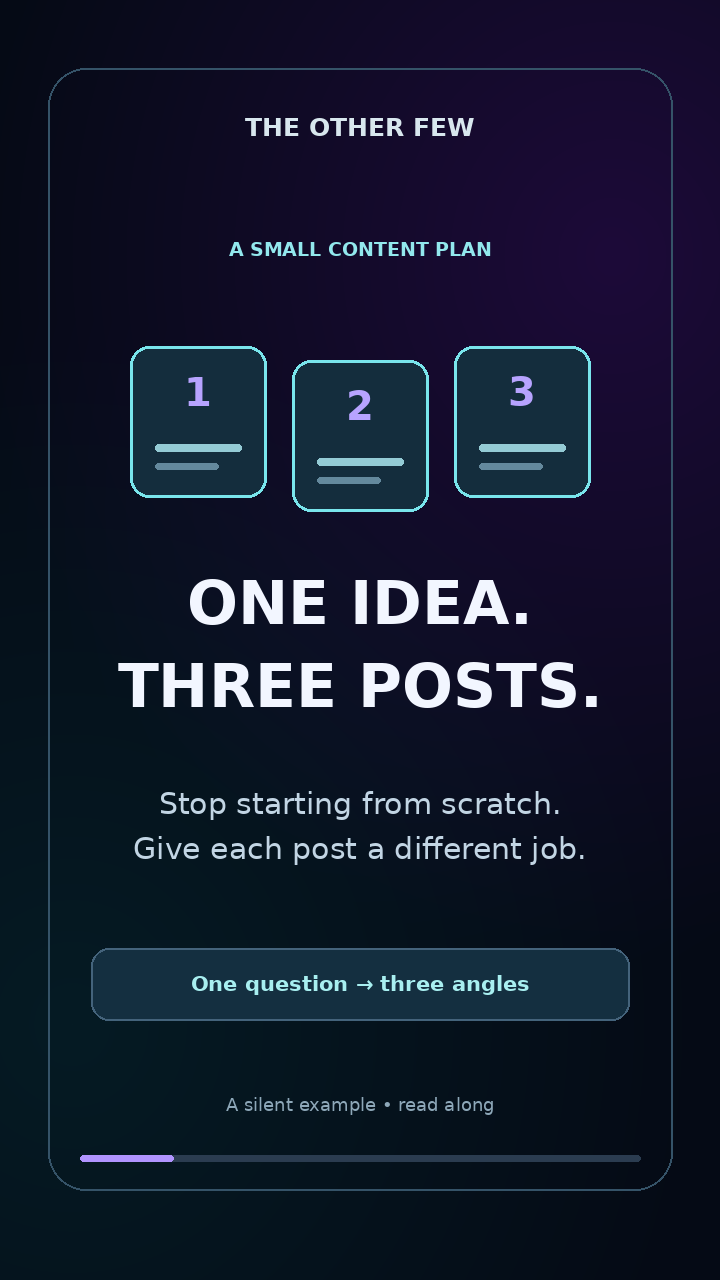
One headline, three simple cards, strong contrast and generous margins. Adapt the layout to your own message.
The pack includes the finished MP4, cover PNG, exact script/storyboard, starter prompt, production record and rebuild source. These original example assets can be adapted for your own learning or business content; do not imply endorsement by The Other Few.
A 30–45 second vertical video answering one real question, an edited caption, a readable cover and a draft ready to schedule. Budget 60–90 minutes for a first attempt; this is a planning estimate, not a measured promise.
For your first version, use your phone, a writing assistant, an editor and the platform’s own publishing tools. Record your own voice if you can. You can add generation tools later when they solve a specific problem.
| Job | Starting route | What to check |
|---|---|---|
| Ideas and scripts | Claude, your existing AI assistant or your notes app. | Provide the facts; review every claim and time a read-through. |
| Footage and visuals | Your phone, a screen recording or Canva. Optional AI illustrations if they help explain. | Asset permissions, readable text and whether the images match the script. |
| Editing and captions | CapCut or an editor you already know. CapCut offers automatic caption tools. | Correct caption errors and test the final export; feature access can vary. |
| Cover or thumbnail | One reusable Canva layout with a short headline. | Preview the crop; cover selection works differently across platforms. |
| Scheduling | Publish in the platform or explore Buffer, which supports Shorts, Reels and TikTok scheduling. | Account permissions, channel support and any steps requiring a notification. |
Start with a £0.00 additional-spend target using your existing phone, own footage and available free features. This is a budget target, not a guarantee that every listed AI feature is free. Before paying, check current limits, watermark rules, export settings and commercial-use terms on the CapCut, Canva and Buffer sites. Pick one bottleneck to spend on only after completing a test.
Choose a question your audience already asks. Write a hook, explain one useful idea and offer a relevant next step. Read it aloud: cut anything you cannot say naturally. AI drafts need your facts and judgement.
Question: Why does my iced coffee taste watery? Goal: teach one useful tip. This is an illustrative script; check the advice against your own recipe before using it.
| Time | Say | Show |
|---|---|---|
| 0–5 sec | “Iced coffee tasting watery? Try changing how you cool it.” | Your own close-up of a drink; overlay: “Watery iced coffee?” |
| 5–18 sec | “Pouring a big hot coffee over ice melts the ice quickly. Start with a smaller, stronger coffee, then add your chilled milk or water.” | Record the steps using your actual recipe. |
| 18–30 sec | “Adjust the strength to your taste, and keep the recipe consistent so you can repeat the cup you like.” | Finished drink; overlay: “Find your recipe. Repeat it.” |
| 30–35 sec | “Save this for your next iced coffee.” | Simple end card with your café name. |
Timings are an outline. Record a read-through and adjust the edit to the actual narration.
Collect three to five shots: the problem, the steps and the finished result. Your own footage, a simple screen recording or clear slides are enough. For AI illustrations, specify the subject, action, lighting and empty space for captions. Add final text in your editor so you can correct it.
Record your voice in a quiet room. An optional AI voice or avatar can help some formats, but check usage rights, names and pronunciation. Use only voices or likenesses you have permission to use.
Create a vertical project; 1080 × 1920 is a practical starting size. Trim pauses, line up the shots and add captions. Correct every caption, especially product names and numbers. Keep key words away from the edges and platform buttons; preview on the destination app.
Choose a cover with one subject and a short, readable headline. Check its crop in the feed and profile preview. Some destinations restrict custom thumbnails or require choosing a frame in their own app.
Export one test before a full batch. Watch the exported file from start to finish on your phone: check the sound, readable captions, crop and any watermark. Only then reuse the design.
Give five videos different jobs: answer a question, demonstrate a step, prevent a mistake, show a genuine example and explain a next action. Save each approved script beside its finished video and cover.
In your scheduler, confirm the destination account name, caption, cover, time zone and date for every item. Preview each platform separately. Where direct publishing is unavailable, follow the scheduler’s notification steps. Check that the post actually appeared and record its URL.
Automate draft preparation, file organisation and reminders first. A later workflow could use a content sheet → Make or another automation tool → a supported scheduler integration. Check that the connector can upload your video, set the right account and handle errors before enabling it.
Keep approval explicit: Idea → Draft → Needs review → Approved → Scheduled → Published. Only items marked Approved should reach a publishing action. Add an error alert and test with one item. This guide does not connect your accounts or install an automation.
Replace the square brackets with your own details. Review the output before moving to the next step.
Act as my short-form content planner. Audience: [who]. Business or topic: [topic]. Goal: [goal]. Approved facts: [facts]. Suggest five different 30–45 second videos. For each give a useful question, a hook, one takeaway, three shots I can record and one relevant next step. Avoid hype, fake results and repeated ideas. Mark missing facts CHECK.
Write a 30–45 second spoken script about [one question] for [audience]. Use only these facts: [facts]. Open with a clear hook, explain one useful idea and end with [next step]. Aim for around 75–100 words, then let me time a read-through. Use plain UK English. Return a table with approximate timing, spoken words, on-screen text and suggested shots. Do not invent facts, testimonials or results.
Using this approved script: [script], create a shot list for a vertical video. Include my own footage or screen recordings first, then optional AI illustration ideas. For each shot give the subject, action, duration and any overlay text. Keep essential text away from the edges. Label AI illustrations as illustrative; do not portray an invented customer result as real.
For this video: [script], suggest three clear cover headlines of at most five words. Audience: [audience]. Use a readable layout with one subject, strong contrast and space around the text. Do not promise a result the video cannot support. Give a design brief I can recreate in Canva.
Turn these five approved scripts: [scripts] into a publishing sheet. Columns: video title, filename, caption, cover headline, destination account, intended UK date and time, link, approval status, published URL and result to review. Keep captions accurate and distinct. Leave missing dates and links blank. Set every item to Needs review. Do not publish anything.
Your ticks save in this browser when storage is available. They are not synced across devices.
After posting, look for a result tied to the goal: useful replies, saves, relevant clicks or enquiries. Where available, watch time and completion can help you spot where people leave. Compare your own videos over time; one quiet post does not prove a format failed.
Keep the useful parts of your template and change one thing in the next batch. Add the next real audience question to your idea list.
The sequence, example and prompts are The Other Few’s editorial suggestions. Plans and publishing options can change; check the official service before committing.
Explore AI tools, software and technology through official sources, clear trade-offs and practical comparisons, so you can find the few that matter to your task.
Recently added to our catalogue, with a reason to explore each one.
Editorial alternatives with a specific reason to consider them.
Describe the outcome, not the software. The Other Few turns the job into a practical stack, keeps overlaps visible, and explains the trade-offs.
We'll break it into jobs, choose the fewest sensible tools and show the trade-offs.
The shortlist now explains the fit, the trade-offs and what to do next.
Translate natural-language goals into task signals before matching products.
Show why a tool fits this search instead of presenting a permanent product score.
Move naturally from shortlist to profile, alternatives, compare and saved tools.
Browse editorial collections when you want to explore rather than solve one task.
The recommendation layer connects tasks, constraints, products, alternatives, workflows and evidence without turning the catalogue into a popularity ranking.
These are the relationships the engine can reason over as the catalogue grows.
With your permission, we use Google Analytics cookies to measure visits and interactions, such as page views, project progress, downloads and link clicks. This sends usage information to Google. You can reject analytics and still use the site, or change your choice using Analytics settings at the bottom of any page.